Wallet Revocation
The revocation of a Wallet Instance may happen for various reasons:
- the user revokes its Wallet Instance, e.g. because it lost its device
- the MDVM revokes a Wallet Instance due to security reasons of the device or wallet app
Wallet Revocation by the User
A common use case for revocation of the Wallet Instance is that the user has lost its device and wants to prevent any mis-use. A loss of the user's device alone is not a security problem, as the platform authentication protects the unlocking of the wallet app and the Remote WSCA PIN additionally protects the PID. However, the user must have additional means to prevent the mis-use of the wallet and its contained credentials, in case the platform authentication and/or RWSCA-PIN are leaked or known by adversaries.
For these reasons, a revocation mechanism is established between the user and the Wallet Provider Backend (WB) during wallet activation. The revocation mechanism must be independent from the Wallet Instance ("out-of-band"), as it is assumed that the user has no access to its device. The setup of the wallet revocation mechanism takes place during the Wallet Activation. The WB stores the information for out-of-band authentication of the user in its WB account database. The available revocation mechanisms are:
The Wallet Provider Backend (WB) provides a website, where the user can authenticate with the revocation mechanism established during wallet activation. The WB tries to verify and associate the authentication to a specific Wallet Instance in its WB account database. If the WB successfully matches the incoming revocation request to a Wallet Instance, it takes the following actions:
- signaling to the Wallet Instance to self-lock and delete all local data
- signaling to the PID/EAA Providers by setting the status of the Wallet Instance Attestation to revoked that will trigger the revocation chaining.
Revocation code
For the revocation code mechanism the WB generates a random secret (wb_wi_revocation_secret) with sufficient entropy during wallet activation. The WB stores the hash of wb_wi_revocation_secret in the WB account database. Storing the hash ensures that potential database leaks do not allow to revoke arbitrary Wallet Instances. The WB uses the raw wb_wi_revocation_secret and encodes it as a single string using Bech32. Bech32 encoding combines base32 encoding (with a good tradeoff between size and user convenience to avoid similar characters) and BCH error detection/correction (in case users need to type the revocation code manually). The resulting revocation code wb_wi_revocation_code is returned to the WI. An example for the Bech32-encoded wb_wi_revocation_code:
The user is instructed about the revocation mechanism and the website for wallet revocation. The WI offers the user different options to store the code:
- copy the code to the clipboard
- export the code within a PDF file for cloud storage or printing
- storage in a synced password manager
If the user wants to revoke the WI, it has to open the WB's revocation website, either manually or following a link/QR-Code in the PDF. The user is once more explained the consequences of wallet revocation. The website contains a single text input form for the Bech32-encoded wb_wi_revocation_code. Depending on the type of storage the user has to:
- paste the code that the user copied from external storage
- click the link or scan the QR-Code (which prefills the text form)
- fill the text form through the synced password manager
The WB will decode the wb_wi_revocation_code, identify the account by wb_wi_id and verify the revocation request by wb_wi_revocation_secret and proceed to take actions to revoke the WI.
At any point of the Wallet Instance's lifecycle, the user may go to the settings of the app and request to receive a newly generated revocation code. This will invalidate the old revocation code.
Revocation Setup
The following section describes the flow for the setup of user-initiated wallet revocation using the revocation code.
Sequence Diagrams
Detailed Description
| No | Description |
|---|---|
| 001 - 012 | Standard procedure for creating and verifying signed request. To be refined when WB flows are merged. |
| 013 | The WB generates the revocation code wb_wi_revocation_code from 128 bits of random, ensuring a sufficiently secure random generator is being used. |
| 014 | The WB updates the Wallet Backend account database to store the hash of the wb_wi_revocation_code for Wallet Instance account wb_wi_id that was authenticated in the request. The WB stores the hash using Argon2id using moderate difficulties, such as m=32MB,t=3,p=1, as the input wb_wi_revocation_code already has very high entropy. Storing the hash instead of the plain wb_wi_revocation_code prevents attackers to revoke arbitrary Wallet Instances in case of a database leak. |
| 015 | The WI calculates the Bech32 encoding using rev for the human readable header part, 1 as the default separator character and the concatenated, raw binary representation of (un-hashed!) wb_wi_revocation_secret. Calculating this string in the backend avoid complexity of keeping the code in sync between backend, Android and iOS implementation. |
| 016 | The WB returns the wb_wi_revocation_code to the WI. |
| 017 | The WB offers multiple options to the user to store the wb_wi_revocation_code. This includes:
|
| 018 | The first option is to store the wb_wi_revocation_code to the clipboard of the mobile operating system. iOS implementations must use UIPasteBoard with localOnly and expirationDate of 60 seconds. Android implementations must follow the secure clipboard handling using ClipDescription.EXTRA_IS_SENSITIVE, the data is flushed automatically after some time. The text copied to the clipboard gives a brief introduction and also provide the URL to the revocation website. The wb_wi_revocation_code should also be visible, so users may take a screenshot instead. |
| 019 - 020 | The WI calculates a URL to the WB's revocation website and appends the wb_wi_revocation_code as a query parameter (for automatically filling the text form). The WI locally generated a PDF using native platform APIs. The PDF gives a brief introduction to the wallet revocation scenario and provides the URL as a click-able link and as a QR-Code. |
| 021 | The WI uses the Autofill functionality to store the wb_wi_revocation_code in the password manager. iOS implementations must use ASPasswordCredential to store the wb_wi_revocation_code. The WI app and WB revocation website must be connected using associated domains. Android implementation must suggest the storage using the AutofillManager by marking the UI element containing wb_wi_revocation_code with AUTOFILL_HINT_NEW_PASSWORD. The WI app and WB revocation website must be connected using Digital Asset Links. |
Wallet Revocation
The following section describes the flow for the wallet revocation initiated by the user.
Sequence Diagrams
Detailed Description
| No | Description |
|---|---|
| 001 - 002 | The user opens the WB's revocation website. The user manually types or copies the wb_wi_revocation_code from external storage, such as messenger, e-mail or physical notes. |
| 003 - 004 | The user opens the PDF to click the embedded link or scans the embedded QR-Code. This opens the WB' revocation website on the user's browser and prefills the input for the wb_wi_revocation_code from the query parameter. |
| 005 - 006 | The user opens the WB's revocation website. The password manager suggests to fill the wb_wi_revocation_code. |
| 007 | The browser website locally checks the entered Bech32-encoding of wb_wi_revocation_code for error detection. |
| 008 | The browser website and the WB's revocation endpoint perform Captcha checks to impede access for bots or DoS. |
| 009 | The browser sends a request to the WB's revocation endpoint containing the wb_wi_revocation_code and potential Captcha information. |
| 010 | The WB calculates the hash of wb_wi_revocation_code using Argon2id with the same parameters as during revocation setup and performs a look-up against the WB account database to identify whether the wb_wi_revocation_code matches against a valid wb_wi_id. If no entry was found, the WB endpoint returns an error. |
| 011 | The WB marks the identified WI as "PENDING_WIA_REVOCATION", to prevent further operations of this WI. |
| 012 - 013 | The WB revokes the status list entries of all WIAs (wb_wia_status) that were previously issued by the wb_wi_id to initiate the revocation chaining. When WIA revocation is completed, the WB marks the state as "PENDING_APP_REVOCATION", marking the WIA revocation as completed, but the self-locking of the WI as outstanding. |
| 014 - 016 | The WB sends a push notification to trigger the WI to check its status. The WI queries the WB's status endpoint to confirm the revocation request and self-locks to delete all the local data. See Wallet Instance self-locking for details. After confirmation by the WI, the WB marks the wb_wi_id as "REVOKED" (successfully deleted). |
Wallet Revocation by the MDVM
If the Mobile Device Vulnerability Management (MDVM) determines that revocation actions are required, this can be triggered by two conditions:
- The MDVM identifies a new vulnerability, requiring revocation for all Wallet Instances associated with affected device classes.
- During the renewal of an MDVM token, a security issue is detected for an individual device.
In both cases, the MDVM identifies the affected Wallet Instances. For device class–based vulnerabilities, this includes all Wallet Instances matching the vulnerable device class. For individual device issues, only the specific affected Wallet Instance is targeted.
The MDVM then requests the execution of revocation actions by sending the shared possession factor public keys (wi_mdvm_auth_pubk) to the WB. The connection is secured via mTLS, and network access to the WB endpoint is restricted to the MDVM.
Sequence Diagram
Detailed Description
| No | Description |
|---|---|
| 001 - 002 | The MDVM filters the MDVM account database for all Wallet Instances that are effected by known vulnerabilities. |
| 003 - 004 | The WI attempts to get a new MDVM token (Android or iOS). During validation of MDVM signals, the MDVM detects a compromise of the WI's mobile device. |
| 005 - 006 | The MDVM sends a request to the WB's internal revocation endpoint containing the list of wi_mdvm_auth_pubk that identify the Wallet Instances to be revoked. This endpoint is secured by mTLS and networking routing ensures that this endpoint is only reachable by the WB. |
| 007 | The WB marks the identified WI as "PENDING_WIA_REVOCATION", to prevent further operations of this WI. |
| 008 - 009 | The WB invalidates the status list entries of all WIAs (wb_wia_status) that were previously issued by the wb_wi_id to initiate the revocation chaining by setting the status list values to INVALID. When WIA revocation is completed, the WB marks the internal state as "PENDING_APP_REVOCATION", marking the WIA revocation as completed, but the self-locking of the WI as outstanding. |
| 010 - 012 | The WB sends a push notification to trigger the WI to check its status. The WI queries the WB's status endpoint to confirm the revocation request and self-locks to delete all the local data. See Wallet Instance self-locking for details. After confirmation by the WI, the WB marks the wb_wi_id as "REVOKED" (successfully deleted). |
Wallet Revocation by the Wallet Provider
The Wallet Provider performs revocation actions if a security incident affecting the trustworthiness of the cryptographic keys managed by the RWSCA, e.g. for the following reasons:
- a compromise of the WSCD hardware or firmware renders the managed keys untrustworthy.
- a vulnerability in the WSCA code compromises the integrity of key operations performed by the RWSCA.
- a compromise of the operating environment undermines the security guarantees of the RWSCA.
In all cases, the WTEs attesting to the keys managed by the RWSCA must be revoked to ensure that PID Providers can no longer rely on credentials bound to them. The Wallet Provder can choose between two revocation mechanisms depending on the scope and nature of the incident:
- WTE status revocation: The RWSCA sets the rwsca_wte_status index of the WSCA to revoked in the Token Status List. This approach is applicable when the impact is limited to a specific RWSCA instance.
- Certificate revocation: The Wallet Provider requests the ecosystem PKI to revoke the WTE signing certificate (attesting to rwscd_wte_auth_prvk). This immediately invalidates all WTEs signed by that certificate, regardless of their individual Token Status List entries, and is used when the signing key itself is considered compromised.
As described in Revocation Chaining, PID Providers regularly monitor the revocation status of WTEs associated with their issued credentials. Once a WTE revocation is detected, the PID Provider revokes the associated PID Batch Credentials, completing the revocation chain.
Revocation Actions
Wallet Instance Self-locking
to be done
Revocation Chaining
Revocation chaining in the EUDI Wallet ecosystem refers to a linkage of the status of both the Wallet Instance Attestation (WIA) and Wallet Trust Evidence (WTE) to the credentials bound to them. This mechanism ensures that PID credentials are revoked after a wallet revocation has been conducted, e.g. initiated either by the user or the MDVM. Revocation chaining is mandatory for the PID Providers (see CIR 2024/2977 Article 5 4. b), therefore Wallet Providers are required to offer revocation status information through issued WIAs and WTEs. The following section describes the different stages of revocation chaining.
The following picture summarizes the process:
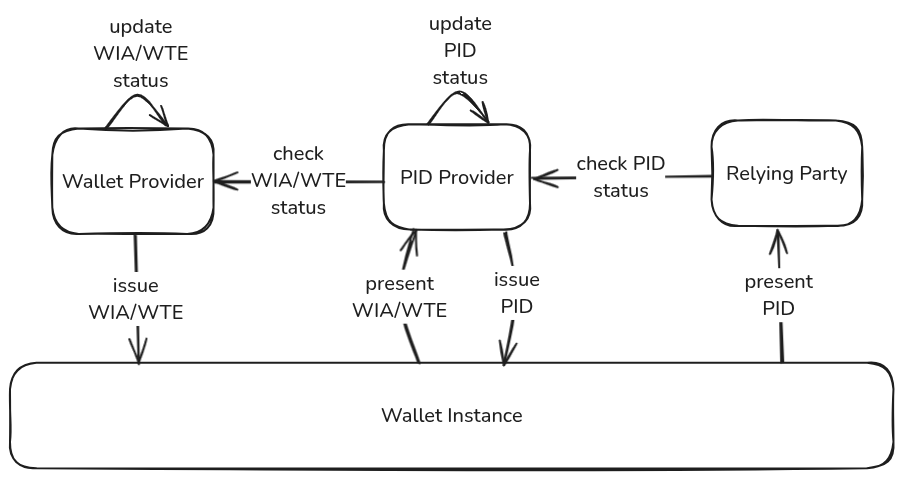
During PID issuance, the WI requests a WIA from the Wallet Backend (WB) and a WTE from the Remote WSCA (RWSCA). The WB maintains the status of the WIA representing the validity of this specific WI, while the RWSCA maintains the status of the WTE representing the validity of the whole WSCD in their respective databases. The PID Provider issues PID Batch Credentials each containing unique status information for revocation and stores a mapping of both WIA/WTE status and the issued PID Batch Credential statuses in its database. The PID Provider is required to regularly check the WIA/WTE status for all its issued PID Batch Credentials and Refresh Tokens.
If an individual Wallet Instance is revoked by the user or due to security issues of the individual device or a vulnerability of the entire device class by the MDVM, the WB revokes all WIAs associated with that specific WI by updating and publishing the Token Status List. As soon as the PID Provider recognizes the revocation of a WIA that was used during issuance through the WB's Token Status List, it has to revoke the associated PID Batch Credentials as well.
If the Wallet Secure Cryptographic Application (WSCA) is revoked by the Wallet Provider due to compromise or security vulnerability, the Wallet Provider revokes all WTEs associated with that WSCA either by setting the rwsca_wte_status index to revoked in the Token Status List, or by requesting the ecosystem PKI to revoke the WTE signing certificate. While a Token Status List index of a WIA corresponds to a particular WI, the status of a WTE covers the status of the entire WSCA. Therefore, the RWSCA maintains a single status for the entire WSCA. As soon as the PID Provider recognizes the revocation of a WTE that was used during issuance (either through the RWSCA's Token Status List or through certificate validation) it has to revoke the associated PID Batch Credentials as well.
The revocation is "chained" from the Wallet Provider to the PID Provider. The Relying Party only verifies the revocation status of the PID credential and thus does not need to manage or understand the security status communicated by WIA and WTE. Once the PID has been revoked as part of this chaining process, the revocation is permanent and cannot be reversed. The revocation chaining mechanism operates entirely through trustworthy backend systems and is therefore effective even if the Wallet Instance is compromised or manipulated.
While the primary subject of the revocation chaining is the PID, the mechanism may be used by EAA Providers to get additional security guarantees for their issued EAA credentials. EAA Providers benefit from wallet revocation initiated by the user and by the MDVM for device class vulnerabilities.