EAA Presentation with OpenID4VP
Basic Idea
The EAA Provider issues signed credentials to the Wallet, which are stored for a longer period. The Wallet can then present the credentials (including a proof of possession by signing over a wallet-held key) to the Relying Party.
The flows described in this document are examples demonstrating one possible implementation approach. According to the Implementing Act on Article 5a and ETSI TS 119 472-1, the following credential formats are supported:
- SD-JWT VC (SD-JWT Verifiable Credentials)
- mdoc (ISO/IEC 18013-5)
Relying Parties must be able to accept and validate credentials in the formats specified by the Implementing Act on Article 5b.
The presentation of an Electronic Attestation of Attributes (EAA) is governed by the ETSI TS 119 472-2 specification. This standard mandates the use of the OID4VC High Assurance Interoperability Profile (OID4VC-HAIP) as the underlying protocol profile.
Cryptographic Formats
Long-Term keys:
- EAA Provider has long-term key pair that is used to sign the credential
- RP has long-term key pair that is used to sign OpenID4VP Authorization Request
- EUDIW generates device key which is used to generate proof of possession of a credential
Transaction-specific keys:
- RP has ephemeral key pair that is used to encrypt the response
Artifacts:
- for mdoc
Same Device Flow
Sequence Diagram
User Journey: EAA Presentation - Same Device
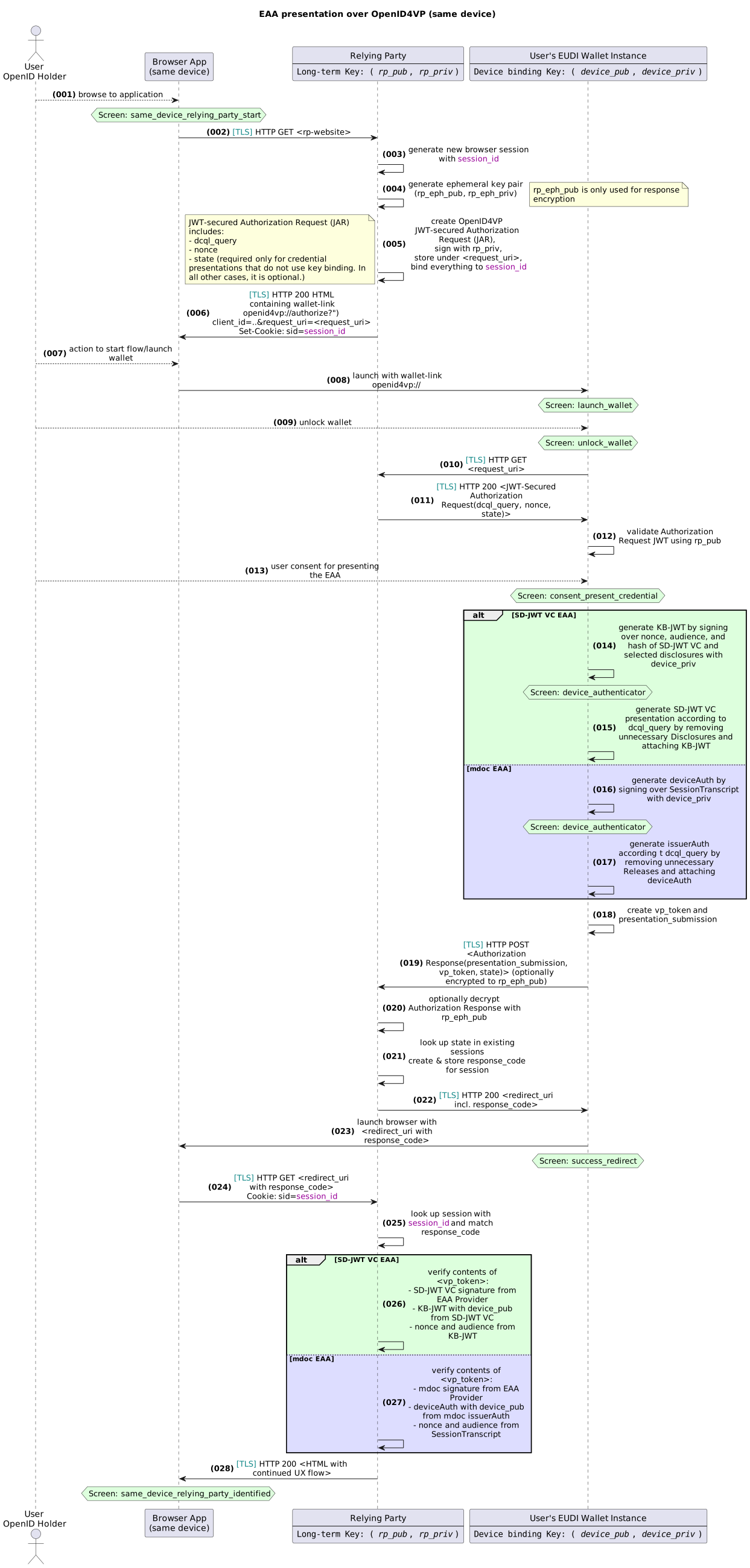
Step-by-Step Description
Note: While certain assumptions about session management of the Relaying Party are made here, the concrete implementation is considered out of scope for this document. The usual security considerations for web session management apply.
| No | Description |
|---|---|
| 001 | User browses to Relying Party (RP) website |
| 002 | Browser app on the user's device opens the RP website |
| 003 | The RP generates a new browser session, depicted session_id |
| 004 | The RP generates a key pair to be used for ECDH key agreement for response encryption |
| 005 | The RP generates an OpenID4VP JWT-secured Authorization Request (JAR), binding it internally to the session_id and stores it under a request_uri (e.g., https://rp.example.com/oidc/request/1234);- The request is bound to the user's browser session - It is signed using a key bound to the RP's metadata that can be retrieved using the RP's client_id - It contains the presentation_definition containing the information about the requested EAAs - It contains RP's nonce and state - It contains the purpose given by the RP |
| 006 | The RP returns a HTML page to the browser containing a link to the wallet app (e.g., openid4vp://authorize?client_id=..&request_uri=https://rp.example.com/oidc/request/1234). It also sets a Cookie with the session_id. |
| 007 | The user clicks on the link |
| 008 | The wallet app is launched with the custom URI scheme |
| 009 | The user unlocks the wallet app (see notes below) |
| 010 | The wallet app retrieves the Authorization Request from the RP website (e.g., https://rp.example.com/oidc/request/1234) |
| 011 | The wallet app receives the Authorization Request |
| 012 | The wallet app validates the Authorization Request using the RP's public key - Was the signature valid and the key bound to the RP's metadata? - Security: This ensures that the Authorization Request was not tampered with; it does not ensure that the party that sent the Authorization Request is the RP. |
| 013 | The Wallet displays information about the identity of the Relying Party and the purpose, the user gives consent to present the EAA. |
| 014 | (SD-JWT VC EAA) The Wallet generates a KB-JWT by signing over nonce,audience, and hash of SD-JWT VC and selected disclosures with device_priv |
| 015 | (SD-JWT VC EAA) The Wallet creates the presentation according to presentation_definition by cutting out the unnecessary Disclosures and appending the KB-JWT |
| 016 | (mdoc EAA) The Wallet generates an mdoc deviceAuth by signing over SessionTranscript with device_priv |
| 017 | (mdoc EAA) The Wallet creates the presentation according to presentation_definition by cutting out the unnecessary Releases assembling the issuerAuth with deviceAuth |
| 018 | The wallet app creates a VP token |
| 019 | The wallet app sends the VP token to the RP (encrypted to the RP's public key rp_eph_pub). |
| 020 | The RP optionally decrypts the Authorization Response with rp_eph_pub received in the Authorization Request. |
| 021 | The RP finds a session with the state, generates a response_code and stores the received vp_token |
| 022 | The RP responds with a redirect inluding the generated response_code. |
| 023 | The wallet launches the browser with the redirect_uri and response_code. |
| 024 | The browser receives the redirect_uri and response_code and sends an HTTP GET request to the RP frontend, this request contains the Cookie set in the beginning of the protocol. |
| 025 | The RP matches the session_id from the Cookie and matches the response_code to find the received vp_token. |
| 026 | (SD-JWT VC EAA) The RP verifies the content of the vp_token. In case of SD-JWT VC it validates the Issuer signature from the EAA Provider, verifies the KB-JWT matching to the cnf claim and validates that the KB-JWT is fresh and matches to its own client_id and nonce. |
| 027 | (mdoc EAA) The RP verifies the content of the vp_token. In case of mdoc it validates the Issuer signature from the EAA Provider, verifies the deviceAuth matching to the deviceKey and validates that the SessionTranscript is fresh and matches to its own client_id and nonce. |
| 028 | The RP considers the user to be identified in the session context and continues the UX flow. |
Cross Device Flow
Sequence Diagram
User Journey: EAA Presentation - Cross Device
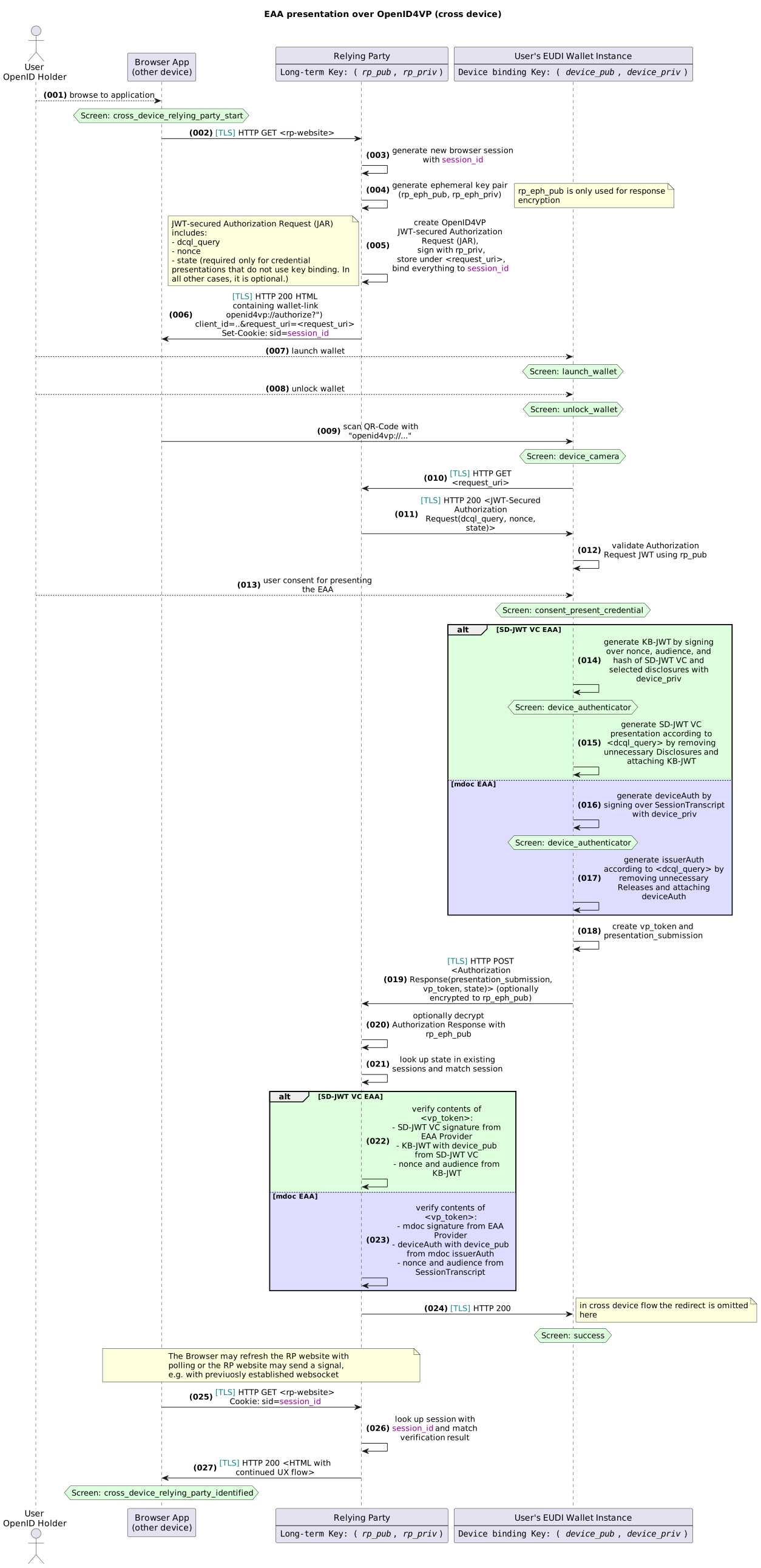
Step-by-Step Description
Note: While certain assumptions about session management of the Relaying Party are made here, the concrete implementation is considered out of scope for this document. The usual security considerations for web session management apply.
| No | Description |
|---|---|
| 001 | The user browses to Relying Party (RP) website |
| 002 | Browser app on the user's device opens the RP website |
| 003 | The RP generates a new browser session, depicted session_id |
| 004 | The RP generates a key pair to be used for ECDH key agreement for response encryption |
| 005 | The RP generates an OpenID4VP JWT-secured Authorization Request (JAR), binding it internally to the session_id and stores it under a request_uri (e.g., https://rp.example.com/oidc/request/1234); - The request is bound to the user's browser session - It is signed using a key bound to the RP's metadata that can be retrieved using the RP's client_id - It contains the presentation_definition containing the information about the requested EAAs - It contains RP's nonce and state - It contains the purpose given by the RP |
| 006 | RP returns a HTML page to the browser containing a QR-Code to the wallet app (e.g., openid4vp://authorize?client_id=..&request_uri=https://rp.example.com/oidc/request/1234). It also sets a Cookie with the session_id. |
| 007 | The user launches the wallet app. |
| 008 | The user unlocks the wallet app (see notes below) |
| 009 | The user scans the QR-Code from the RP's website. The wallet decodes the Authorization Request and starts the OpenID4VP Flow. |
| 010 | The wallet app retrieves the Authorization Request from the RP website (e.g., https://rp.example.com/oidc/request/1234) |
| 011 | The wallet app receives the Authorization Request |
| 012 | The wallet app validates the Authorization Request using the RP's public key - Was the signature valid and the key bound to the RP's metadata? - Security: This ensures that the Authorization Request was not tampered with; it does not ensure that the party that sent the Authorization Request is the RP. |
| 013 | The Wallet displays information about the identity of the Relying Party and the purpose, the user gives consent to present the EAA. |
| 014 | (SD-JWT VC EAA) The Wallet generates a KB-JWT by signing over nonce,audience, and hash of SD-JWT VC and selected disclosures with device_priv |
| 015 | (SD-JWT VC EAA) The Wallet creates the presentation according to presentation_definition by cutting out the unnecessary Disclosures and appending the KB-JWT |
| 016 | (mdoc EAA) The Wallet generates an mdoc deviceAuth by signing over SessionTranscript with device_priv |
| 017 | (mdoc EAA) The Wallet creates the presentation according to presentation_definition by cutting out the unnecessary Releases assembling the issuerAuth with deviceAuth |
| 018 | The wallet app creates a VP token |
| 019 | The wallet app sends the VP token to the RP (encrypted to the RP's public key rp_eph_pub). |
| 020 | The RP optionally decrypts the Authorization Response with rp_eph_pub received in the Authorization Request. |
| 021 | The RP matches the browser session with the state parameter. |
| 022 | (SD-JWT VC EAA) The RP verifies the content of the vp_token. In case of SD-JWT VC it validates the Issuer signature from the EAA Provider, verifies the KB-JWT matching to the cnf claim and validates that the KB-JWT is fresh and matches to its own client_id and nonce. |
| 023 | (mdoc EAA) The RP verifies the content of the vp_token. In case of mdoc it validates the Issuer signature from the EAA Provider, verifies the deviceAuth matching to the deviceKey and validates that the SessionTranscript is fresh and matches to its own client_id and nonce. |
| 024 | The RP responds with HTTP 200 and acknowledges the received vp_token. |
| 025 | The browser refreshes the RP's website, either by polling regularly or by receiving a signal from the RP, e.g. through websockets. It sends a HTTP GET request using the Cookie set in the beginning of the protocol. |
| 026 | The RP matches the session_id from the Cookie and matches this with the verification result. |
| 027 | The RP considers the user to be identified in the session context and continues the UX flow. |
Usability Considerations
Common Considerations
- Relying Party should inform users in advance of what is required for the process to be completed successfully and what steps to follow
- For reasons of transparency and to increase trust, Relying Parties should provide sufficient information (metadata) for the consent screen. This allows users to learn everything relevant e.g. about the relying party itself, privacy and data retention
- The user's data values for the requested attributes can be displayed on the consent screen
- The user only needs to confirm the EAA presentation with the Device Authenticator
Same Device Considerations
- It needs to be clarified whether the wallet app needs to be unlocked in this flow, as the device authenticator is requested again directly after the consent screen. This might create friction and feel redundant to users
- It must be ensured that users are returned to the correct tab in the correct browser in order to continue the process or users know how to get there manually, if necessary (especially for iOS devices, if the process was not started in the default browser)
Cross Device Considerations
- It needs to be clarified whether the wallet app needs to be unlocked in this flow and how this should be implemented.
- User can then continue with the process on the RP page on the second device (page must be updated accordingly by the RP)
Privacy Considerations
- Selective Disclosure is achieved by ensuring that the presentation contains only those data items (claims) that are requested by the RP. The selective disclosure features of SD-JWT VC are used to this end.
- Unlinkability has to be achieved with batch issuance
- In Presentation Step 5, a malicious app may spoof the wallet app; an attacker
may
- on his own device: Capture the request and replay it to a victim on another device, thus having the victim identify itself in a context of the attacker (Relaying Attack breaking Identification Context); or
- on the victim's device: Capture the request and spoof the whole identification process or parts of it (Wallet App Spoofing).
- In Presentation Step 5: An attacker acting as an RP can forward a request from
a different RP.
- As long as the request remains unchanged, we're in the Relaying Attack breaking Identification Context
- If the attacker changes anything in the request, this will break the signature. The attacker could otherwise attempt to - insert his own ephemeral key, leading to an SD-JWT VC artifact that could be used in a different flow between the attacker and some other RP. - modify state or nonce or other data. Q: Any useful attacks resulting from this?
- In Presentation Step 14: The RP must not consider the user identified at this point; it is important to have the browser redirect in the later steps.
Requirements for EAA Presentation and Validation
When validating presented EAA credentials, Relying Parties must verify the issuer's digital signature.
Supported Signature Formats
The digital signature for EAA must fulfill one of the following signature formats:
| Signature Format | ETSI Standard | Typical Use Case |
|---|---|---|
| CAdES | ETSI EN 319 122 | Binary data, CMS-based signatures |
| CBAdEs. | ETSI TS 119 152-1 | CBOR data signatures (mdoc deviceAuth) |
| XAdES | ETSI EN 319 132 | XML-based signatures |
| ASiC | ETSI EN 319 162 | Container format for multiple signatures |
| JAdES | ETSI TS 119 182-1 | JSON/JWT-based signatures (SD-JWT VC) |
The choice of signature format depends on the credential format:
- SD-JWT VC: JAdES (ETSI TS 119 182-1) - JSON Web Signature based
- mdoc: CBAdEs or COSE signatures per ISO/IEC 18013-5
Relying Party Validation Requirements
Relying Parties verifying EAA must:
- Verify the issuer signature using one of the supported signature formats
- Verify the holder binding (KB-JWT for SD-JWT VC, deviceAuth for mdoc)
- Check credential validity including expiration and revocation status
References
- ETSI TS 119 472-1: General requirements for electronic attestations of attributes
- ETSI TS 119 472-2: Presentation requirements
- Implementing Act on Article 5a/5b: Credential formats for issuance and presentation