3.1.3 Wallet Revocation
The revocation of a Wallet Instance may happen for various reasons:
- the user revokes its Wallet Instance, e.g. because it lost its device
- the MDVM revokes a Wallet Instance due to security reasons of the device or wallet app
- the Wallet Provider revokes the RWSCA due to security reasons
Wallet Revocation by the User
A common use case for revocation of the Wallet Instance is that the user has lost its device and wants to prevent any mis-use. A loss of the user's device alone is not a security problem, as the platform authentication protects the unlocking of the wallet app and the Remote WSCA PIN additionally protects the PID. However, the user must have additional means to prevent the mis-use of the wallet and its contained credentials, in case the platform authentication and/or RWSCA-PIN are leaked or known by adversaries.
For these reasons, a revocation mechanism is established between the user and the Wallet Provider Backend (WPB) during wallet activation. The revocation mechanism must be independent from the Wallet Instance ("out-of-band"), as it is assumed that the user has no access to its device. The setup of the wallet revocation mechanism takes place during the Wallet Activation. The WPB stores the information for out-of-band authentication of the user in its WPB account database. The available revocation mechanisms are:
The Wallet Provider Backend (WPB) provides a website, where the user can authenticate with the revocation mechanism established during wallet activation. The WPB tries to verify and associate the authentication to a specific Wallet Instance in its WPB account database. If the WPB successfully matches the incoming revocation request to a Wallet Instance, it takes the following actions:
- signaling to the Wallet Instance to self-lock and delete all local data
- signaling to the PID/EAA Providers by setting the status of the Wallet Instance Attestation to revoked that will trigger the revocation chaining.
- signaling to the other backends (MDVM and RWSCA) to mark the Wallet Instance as revoked as well, see revocation propagation between backends.
Revocation code
For the revocation code mechanism the WPB generates a random secret (wpb_wi_revocation_secret) with sufficient entropy during wallet activation. The WPB stores the hash of wpb_wi_revocation_secret in the WPB account database. Storing the hash ensures that potential database leaks do not allow to revoke arbitrary Wallet Instances. The WPB uses the raw wpb_wi_revocation_secret and encodes it as a single string using Bech32. Bech32 encoding combines base32 encoding (with a good tradeoff between size and user convenience to avoid similar characters) and BCH error detection/correction (in case users need to type the revocation code manually). The resulting revocation code wpb_wi_revocation_code is returned to the WI. An example for the Bech32-encoded wpb_wi_revocation_code:
The user is instructed about the revocation mechanism and the website for wallet revocation. The WI offers the user different options to store the code:
- copy the code to the clipboard
- export the code within a PDF file for cloud storage or printing
- storage in a synced password manager
If the user wants to revoke the WI, it has to open the WPB's revocation website, either manually or following a link/QR-Code in the PDF. The user is once more explained the consequences of wallet revocation. The website contains a single text input form for the Bech32-encoded wpb_wi_revocation_code. Depending on the type of storage the user has to:
- paste the code that the user copied from external storage
- click the link or scan the QR-Code (which prefills the text form)
- fill the text form through the synced password manager
The WPB will decode the wpb_wi_revocation_code, identify the account by wpb_wi_id and verify the revocation request by wpb_wi_revocation_secret and proceed to take actions to revoke the WI.
The user's revocation code is created during wallet activation. It can not be changed, but the user may go to the settings to view the revocation code again. Later iterations of the WI may allow to renew the revocation code, but is currently not supported.
Revocation Setup
The following section describes the flow for the setup of user-initiated wallet revocation using the revocation code.
The following table describes the steps of the sequence diagram in more detail:
| No | Description |
|---|---|
| 001 | The wpb_wi_revocation_code is generated by the WPB and returned to the WI during Wallet Registration (see Steps 011 - 014 of the Create Account operation). The revocation code section describes its generation and encoding in more detail. |
| 002 | The WI shows the user an introduction to the wallet revocation mechanism and the options to store the wpb_wi_revocation_code. |
| 003 | The WI offers multiple options to the user to store the wpb_wi_revocation_code. This includes:
|
| 004 | The first option is to store the wpb_wi_revocation_code to the clipboard of the mobile operating system. iOS implementations must use UIPasteBoard with localOnly and expirationDate of 60 seconds. Android implementations must follow the secure clipboard handling using ClipDescription.EXTRA_IS_SENSITIVE, the data is flushed automatically after some time. The text copied to the clipboard gives a brief introduction and also provide the URL to the revocation website. The wpb_wi_revocation_code should also be visible, so users may take a screenshot instead. |
| 005 - 006 | The WI calculates a URL to the WPB's revocation website and appends the wpb_wi_revocation_code as a query parameter (for automatically filling the text form). The WI locally generated a PDF using native platform APIs. The PDF gives a brief introduction to the wallet revocation scenario and provides the URL as a click-able link and as a QR-Code. |
| 007 | The WI uses the Autofill functionality to store the wpb_wi_revocation_code in the password manager. iOS implementations must use ASPasswordCredential to store the wpb_wi_revocation_code. The WI app and WPB revocation website must be connected using associated domains. Android implementation must suggest the storage using the AutofillManager by marking the UI element containing wpb_wi_revocation_code with AUTOFILL_HINT_NEW_PASSWORD. The WI app and WPB revocation website must be connected using Digital Asset Links. |
Wallet Revocation
The following section describes the flow for the wallet revocation initiated by the user. The flow ends with the publication of a revocation event to the revocation queue. The revocation operations that the backends execute upon fetching the event are described as dedicated Revoke Account operations of the WPB, the MDVM and the RWSCA.
The following table describes the steps of the sequence diagram in more detail:
| No | Description |
|---|---|
| 001 - 002 | The user opens the WPB's revocation website. The user manually types or copies the wpb_wi_revocation_code from external storage, such as messenger, e-mail or physical notes. |
| 003 - 004 | The user opens the PDF to click the embedded link or scans the embedded QR-Code. This opens the WPB' revocation website on the user's browser and prefills the input for the wpb_wi_revocation_code from the query parameter. |
| 005 - 006 | The user opens the WPB's revocation website. The password manager suggests to fill the wpb_wi_revocation_code. |
| 007 | The browser website locally checks the entered Bech32-encoding of wpb_wi_revocation_code for error detection. |
| 008 | The WPB's revocation endpoint is public and is therefore protected against automated abuse and application-layer denial-of-service through rate limiting. As the endpoint is unauthenticated, the WPB applies per-IP rate limits and throttles repeated requests. Protections may be added by non-interactive challenges issued by the WPB , e.g. Proof-of-Work (PoW) captcha. These measures protect endpoint availability; they are not required to prevent guessing of the wpb_wi_revocation_code. |
| 009 | The browser sends a request to the WPB's revocation endpoint containing the wpb_wi_revocation_code and the challenge solution. |
| 010 | The WPB decodes the wpb_wi_revocation_code to recover the wpb_wi_revocation_secret and calculates its SHA-256 hash in the same way as during wallet registration and performs a look-up against the WPB account database to identify whether the hash matches against a valid wpb_wi_id. If no entry was found, the WPB endpoint returns an error. The WPB also retrieves the possession factor wi_mdvm_auth_pubk stored for the wpb_wi_id, which is used to propagate the revocation to the other backends. |
| 011 | The WPB publishes a revocation event to the revocation queue. The event contains the wi_mdvm_auth_pubk_jkt, which identifies the Wallet Instance across all backends, see revocation propagation between backends for details. All three backends fetch the event and execute their respective Revoke Account operation (WPB, MDVM and RWSCA) to block the account. |
| 012 - 013 | Once the WPB has verified the revocation request and published the revocation event, it returns a success response to the revocation website, which displays a confirmation of the successful wallet revocation to the user. The revocation operations of the backends are executed asynchronously to this response. |
Wallet Revocation by the MDVM
If the Mobile Device Vulnerability Management (MDVM) determines that revocation actions are required, this can be triggered by two conditions:
- The MDVM identifies a new vulnerability, requiring revocation for all Wallet Instances associated with affected device classes.
- During the renewal of an MDVM token, a security issue is detected for an individual device.
In both cases, the MDVM identifies the affected Wallet Instances. For device class–based vulnerabilities, this includes all Wallet Instances matching the vulnerable device class. For individual device issues, only the specific affected Wallet Instance is targeted.
The MDVM marks the affected accounts as revoked by setting their mdvm_wi_state to REVOKED and then requests the execution of revocation actions at the other two backends by publishing revocation events containing the wi_mdvm_auth_pubk_jkt of the affected Wallet Instances to the revocation queue, see revocation propagation between backends. Upon fetching these events, the WPB and the RWSCA execute their respective Revoke Account operations (WPB and RWSCA) to block the accounts.
The following table describes the steps of the sequence diagram in more detail:
| No | Description |
|---|---|
| 001 - 002 | The MDVM filters the MDVM account database for all Wallet Instances that are effected by known vulnerabilities. |
| 003 - 004 | The WI attempts to get a new MDVM token (Android or iOS). During validation of MDVM signals, the MDVM detects a compromise of the WI's mobile device. |
| 005 | The MDVM marks the affected accounts as revoked by setting their mdvm_wi_state to REVOKED. This ensures that the revoked Wallet Instances can no longer renew their MDVM token, see the MDVM renewal flows. |
| 006 | The MDVM publishes one revocation event per affected Wallet Instance to the revocation queue. Each event contains the wi_mdvm_auth_pubk_jkt, which identifies the Wallet Instance across all backends, see revocation propagation between backends for details. Upon fetching these events, the WPB and the RWSCA execute their respective Revoke Account operations (WPB and RWSCA) to block the accounts. |
Wallet Revocation by the Wallet Provider
The Wallet Provider performs revocation actions if a security incident affecting the trustworthiness of the cryptographic keys managed by the RWSCA, e.g. for the following reasons:
- a compromise of the WSCD hardware or firmware renders the managed keys untrustworthy.
- a vulnerability in the WSCA code compromises the integrity of key operations performed by the RWSCA.
- a compromise of the operating environment undermines the security guarantees of the RWSCA.
In all cases, the WTEs attesting to the keys managed by the RWSCA must be revoked to ensure that PID Providers can no longer rely on credentials bound to them. As the WTE currently does not contain status information, this is done by informing the PID Provider to revoke the WTE signing certificate containing rwscd_wte_auth_pubk out of band. This revokes all WTEs of the RWSCA at once, which is adequate as a compromise of the RWSCA would affect all RWSCA user accounts. Once the PID Provider has received the information, he revokes the refresh tokens and PID credentials as part of the revocation chaining.
Revocation Chaining
Revocation chaining in the EUDI Wallet ecosystem refers to a linkage of the status of the Wallet Instance Attestation (WIA) and the validity of the Wallet Trust Evidence (WTE) to the credentials bound to them. This mechanism ensures that PID credentials are revoked after a wallet revocation has been conducted, e.g. initiated either by the user or the MDVM. Revocation chaining is mandatory for the PID Providers (see CIR 2024/2977 Article 5 4. b), therefore Wallet Providers are required to offer revocation status information through issued WIAs. The following section describes the different stages of revocation chaining.
The following picture summarizes the process:
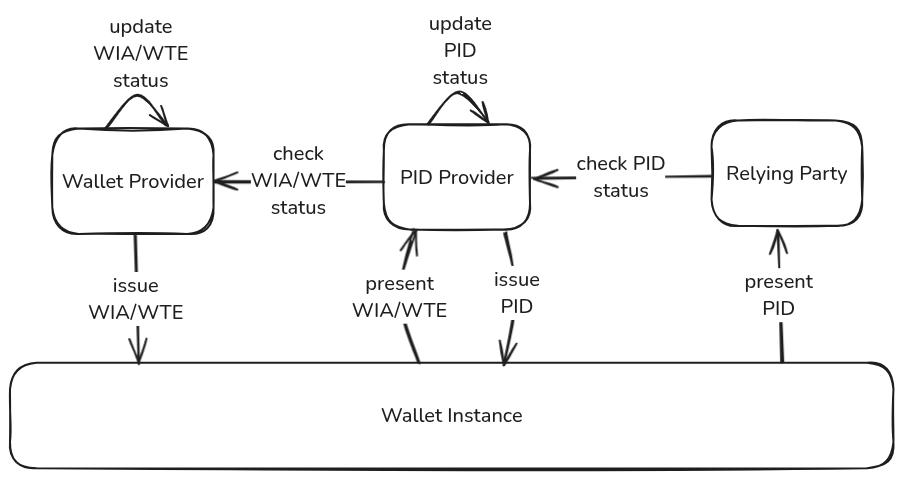
During PID issuance, the WI requests a WIA from the Wallet Provider Backend (WPB) and a WTE from the Remote WSCA (RWSCA). The WPB maintains the status of the WIA representing the validity of this specific WI in its database, while the validity of the WTE is given until the Wallet Provider informs the PID Provider about its revocation. The PID Provider issues PID Batch Credentials each containing unique status information for revocation and stores a mapping of the WIA status and the WTE signing certificate to the issued PID Batch Credential statuses in its database. The PID Provider is required to regularly check the WIA status for all its issued PID Batch Credentials and Refresh Tokens. As the WTE currently does not contain status information, a revocation of the WTE signing certificate is communicated manually by the Wallet Provider.
If an individual Wallet Instance is revoked by the user or due to security issues of the individual device or a vulnerability of the entire device class by the MDVM, the WPB revokes all WIAs associated with that specific WI by updating and publishing the Token Status List. As soon as the PID Provider recognizes the revocation of a WIA that was used during issuance through the WPB's Token Status List, it has to revoke the associated PID Batch Credentials as well.
If the Wallet Secure Cryptographic Application (WSCA) is revoked by the Wallet Provider due to compromise or security vulnerability, the Wallet Provider revokes all WTEs associated with that WSCA by manually informing the PID Provider. While a Token Status List index of a WIA corresponds to a particular WI, the revocation of a WTE covers the entire WSCA. As soon as the PID Provider has received this information, it has to revoke the Refresh Tokens and PID Batch Credentials associated with the WTE signing certificate as well.
The revocation is "chained" from the Wallet Provider to the PID Provider. The Relying Party only verifies the revocation status of the PID credential and thus does not need to manage or understand the security status communicated by WIA and WTE. Once the PID has been revoked as part of this chaining process, the revocation is permanent and cannot be reversed. The revocation chaining mechanism operates entirely through trustworthy backend systems and is therefore effective even if the Wallet Instance is compromised or manipulated.
While the primary subject of the revocation chaining is the PID, the mechanism may be used by EAA Providers to get additional security guarantees for their issued EAA credentials. EAA Providers benefit from wallet revocation initiated by the user and by the MDVM for device class vulnerabilities.
Wallet Instance Self-locking
The Push Notification Service (PNS) sends a signal to the WI to self-lock and delete sensitive data. This mechanism is used for multiple purposes:
- it ensures that access to the Wallet Instance (app) is blocked and sensitive data is deleted. It is important to understand that this mechanism is not intended to block attackers with high attack potential, which is ensured by revocation chaining, however the mechanism is deemed sufficient for low assurance use cases
- it complements revocation chaining, which revokes credentials, but not the wallet app itself
- in case of revocation by the MDVM, the user is notified about the revocation and may react depending on the reason of revocation, e.g. by installing app or OS updates
Push notifications are strictly opt-in, see the PNS design decisions for the rationale. Users who decline the opt-in still learn of a revocation via the regular renewal of the mdvm_token, but lose the proactive, out-of-session signal. The self-lock is a best-effort feature for user experience and data hygiene, not a hard security control: the security of the revocation itself is established by revocation chaining through trustworthy backend systems.
The revocation signal is delivered to the WI through the PNS's Send Push Notification operation, triggered by a push notification event that the MDVM's Revoke Account operation publishes to the push notification queue; see that operation for the delivery mechanism and priority configuration.
The push notification message itself contains only minimal data and acts as a signal for the WI to fetch and confirm actions from the backend by authenticated requests (pull). The WI confirms the revocation by attempting a renewal of its mdvm_token (Android or iOS): the MDVM rejects the renewal for a revoked account with an explicit REVOKED error, which the WI treats as the confirmation to self-lock. The WI must only self-lock upon the explicit REVOKED error, never upon transient failures such as network errors.
Sequence Diagram
Detailed Description
| No | Description |
|---|---|
| 001 - 002 | The MDVM's Revoke Account operation publishes a push notification event to the push notification queue, which triggers the PNS's Send Push Notification operation to deliver the push notification to the WI through the MPP; see that operation for the delivery mechanism and priority configuration. The push notification carries only a minimal revocation signal and no security-relevant payload, since authoritative actions are performed by the WI through the subsequent authenticated pull request in step 003. |
| 003 | The WI attempts to renew its mdvm_token (Android or iOS). The MDVM rejects the renewal with an explicit REVOKED error, as the revocation has been propagated to the MDVM through the revocation queue or originated there. The WI treats only this explicit error as the confirmation of the revocation; transient failures such as network errors must not trigger the self-lock, and if the renewal still succeeds within the propagation race window of a user-initiated revocation, the WI retries after a short delay. Users who did not opt in to push notifications reach this step through the regular mdvm_token renewal, at the latest on the first app launch after the current mdvm_token has expired, instead of steps 001 - 002. |
| 004 | The WI immediately self-locks the user interface to prevent any further user interaction with the wallet app and aborts any ongoing flows, such as credential issuance or presentation. The self-lock is enforced before any user-visible message and before deletion of local data, to ensure that no operation can be performed on the credentials between revocation detection and data deletion. |
| 005 | The WI deletes all locally stored sensitive data, including issued credentials, cached attestations, mpp_registration_token, key material protected by the platform authenticator, and any persistent state associated with the wallet account. The data needed for the revocation message in step 006 is retained in memory and is not part of the persistent state being deleted. |
| 006 | The WI shows a revocation message to the user, informing them that the Wallet Instance has been revoked. Where available, the message includes context about the reason for revocation (e.g. user-initiated revocation, MDVM-triggered revocation due to an individual device compromise, or revocation due to a device class vulnerability), so that the user can take appropriate follow-up steps such as installing app or OS updates, if applicable. |
| 007 | The WI resets itself to the initial state, equivalent to the state after downloading the app. The self-lock of step 004 is lifted as part of the reset and the WI is ready to start the initial start-up of the wallet activation. Note that a new wallet activation may fail if the self-lock was caused by an MDVM-triggered revocation. |
Revocation Propagation between Backends
A Wallet Instance is registered independently at all three backends (MDVM, WPB and RWSCA), each maintaining its own account record. When a Wallet Instance is revoked by the user or by the MDVM, the revocation is propagated to the other two backends, so that each backend can independently reject any further interaction with the revoked Wallet Instance.
The only identifier shared across all three backends is the possession factor wi_mdvm_auth_pubk, which is established during MDVM registration and stored next to the respective account identifier at the MDVM (mdvm_wi_id), the WPB (wpb_wi_id) and the RWSCA (rwsca_account_id). It therefore serves as the join key for propagating revocations between backends.
For this purpose, the backends share the revocation queue hosted on the Message Queue (MQ). When a revocation is triggered, the initiating backend (WPB or MDVM) publishes one revocation event per affected Wallet Instance to the queue. All backends continuously fetch the revocation events from the queue. On consumption, each backend executes its dedicated Revoke Account operation (WPB, MDVM and RWSCA): it looks up the affected account using the wi_mdvm_auth_pubk_jkt and marks the corresponding internal state (mdvm_wi_state, wpb_wi_state or rwsca_account_state) as REVOKED, thereby blocking the account. Each backend then rejects further user authentication for the revoked account. The canonical identification of Wallet Instances through the wi_mdvm_auth_pubk_jkt, the delivery guarantees of the queue and the idempotent processing of revocation events are described in the Message Queue chapter.