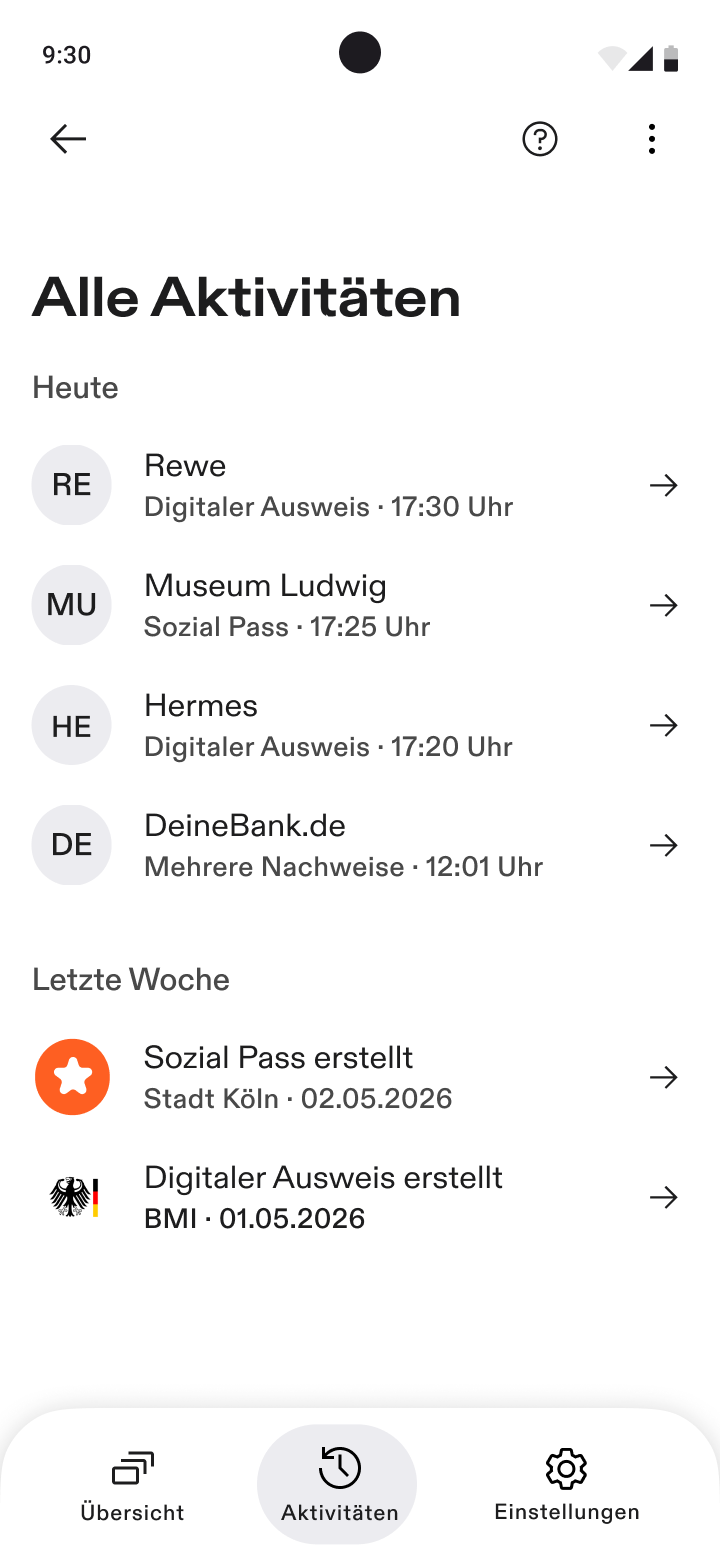
3.1.2 Wallet Dashboard
This flow describes the Wallet Dashboard, the function that gives the user an overview of the credentials stored in the Wallet Instance (WI) and of the transactions carried out with it.
Design Decisions
The dashboard is a local function of the WI: all data displayed is stored within the WI and no backend service of the Wallet Provider is involved, so that the Wallet Provider learns nothing about the user's credentials or transactions.
The dashboard covers the following aspects:
- Credential Overview: a list of all credentials held by the WI
- Credential Inspection: a sub-screen for a particular Credential, such as the attributes, the issuer and the validity
- Credential Data: a detailed sub-screen for the attribute data of a particular Credential
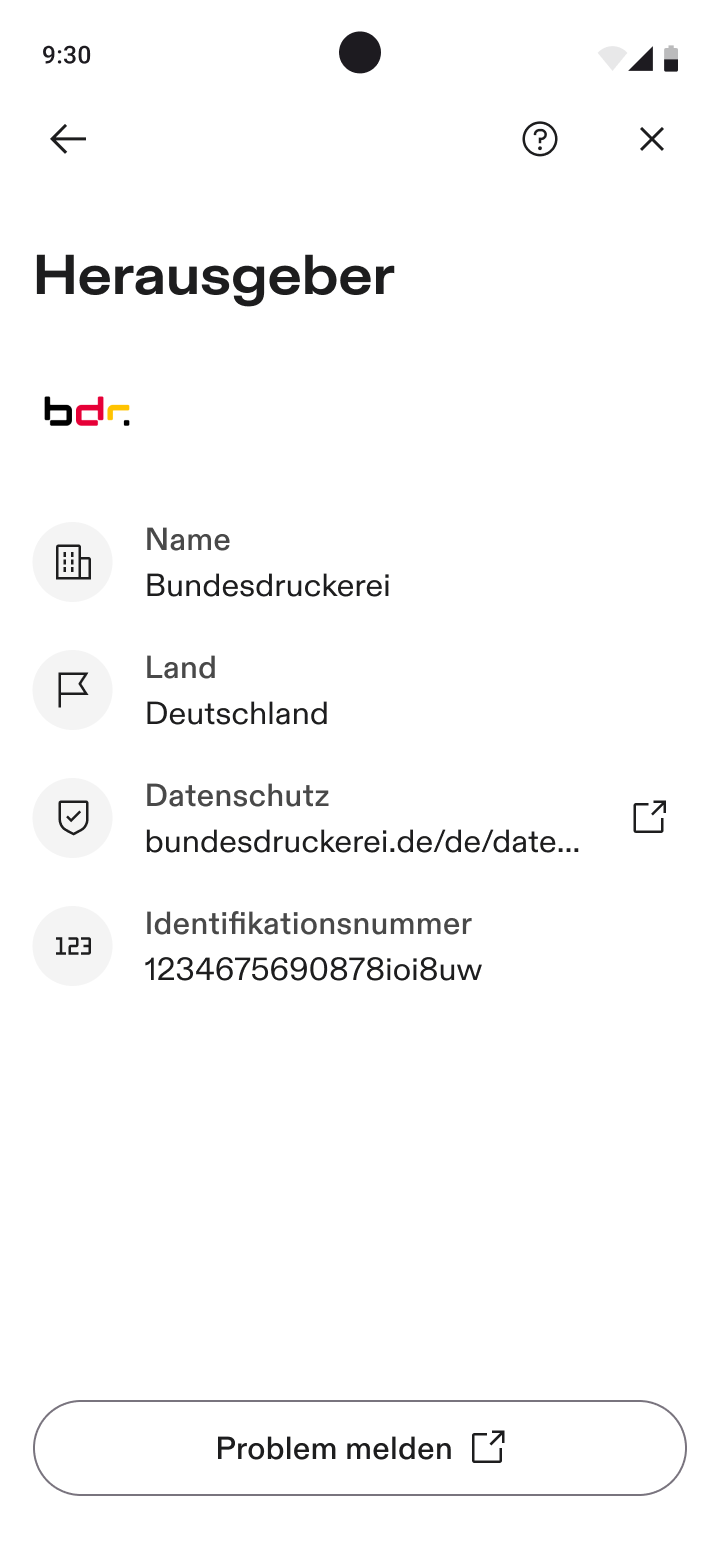
- Credential Issuer: a detailed sub-screen for the issuer of a particular Credential
- Transaction Log: a log of all transactions carried out by the WI, including issuance, presentation and deletion of credentials
The PID is differentiated from the EAA's to signify its special role as a high assurance identification means and encourage users to perform the PID issuance.
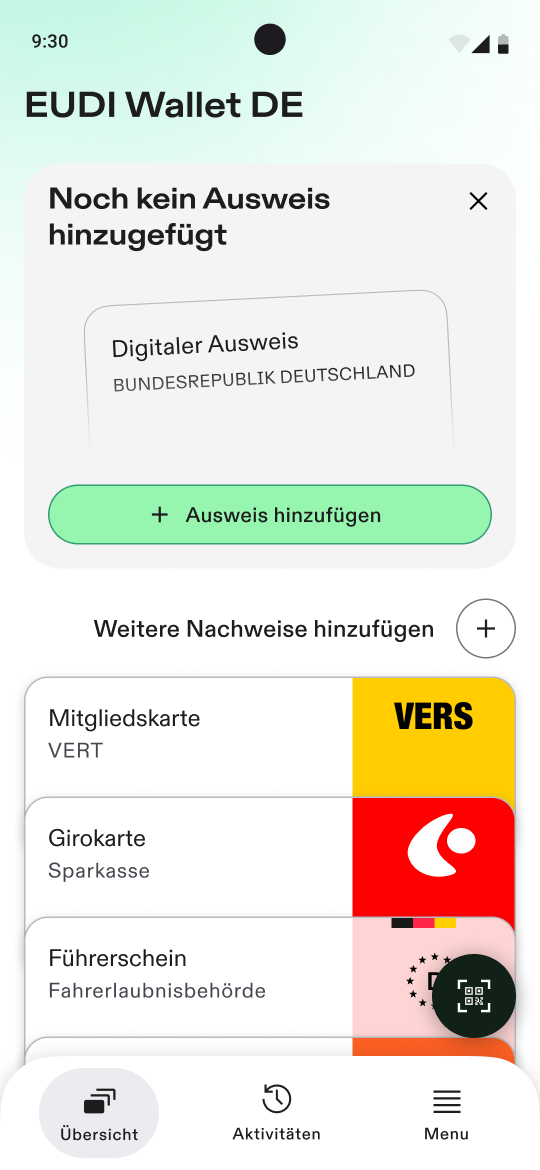
Credential Overview
The credential overview screen consists of:
- the PID Credential card view, showing:
- the PID's name (
credential_metadata.display.nameof the PID Provider's pp_meta_data) and the PID Provider's name (nameof the PID Provider's pp_registration_cert) on the left - the PID's logo and background color (
credential_metadata.display.background_colorandcredential_metadata.display.logoof the PID Provider's pp_meta_data) on the right - the PID's background image (
credential_metadata.display.background_imageof the PID Provider's pp_meta_data) on the bottom - if no PID has been issued yet, the card view is replaced by a component to start the PID issuance
- the PID's name (
- a link to the credential catalogue, enabling the EAA issuance
- a list of EAA credential card views, stacked on top of each other, each item showing:
- the EAA's name (
credential_metadata.display.nameof the EAA Provider's ep_meta_data) and the EAA Provider's name (nameof the EAA Provider's ep_registration_cert) on the left - the EAA's logo and background color (
credential_metadata.display.background_colorandcredential_metadata.display.logoof the EAA Provider's ep_meta_data) on the right
- the EAA's name (
Further information on UI restrictions and fallbacks can be found in the credential style guide.
Credential Inspection
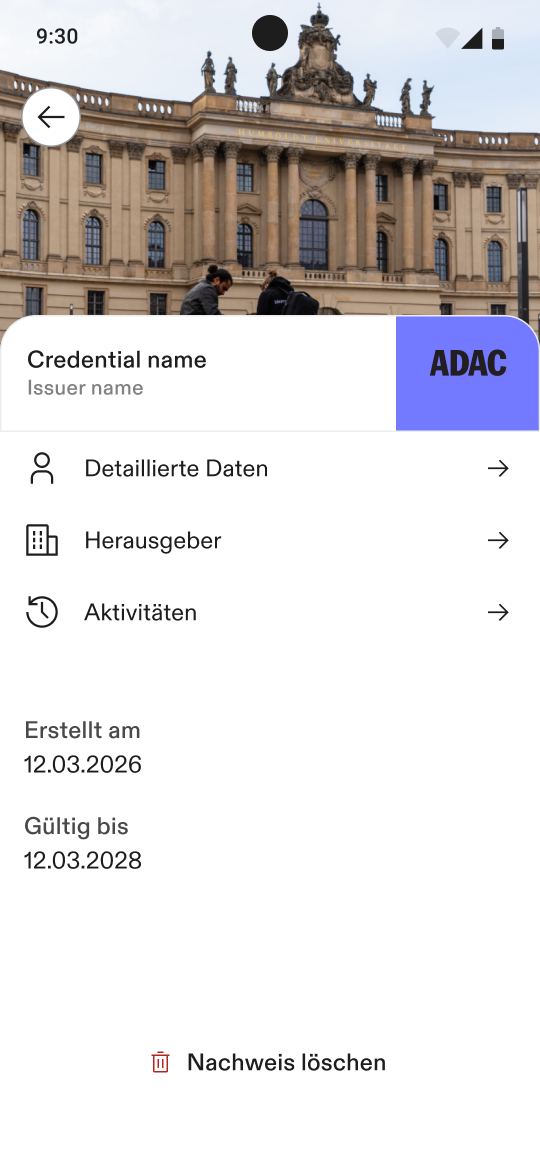
The credential inspection screen shows detailed information on a particular credential (PID or EAA) consisting of:
- the Credential's background image (
credential_metadata.display.background_imageof the PID/EAA Provider's pp/ep_meta_data) on the top - the Credential's name (
credential_metadata.display.nameof the PID/EAA Provider's pp/ep_meta_data) and the PID/EAA Provider's name (nameof the PID/EAA Provider's pp/ep_registration_cert) on the left - the Credential's logo and background color (
credential_metadata.display.background_colorandcredential_metadata.display.logoof the PID/EAA Provider's pp/ep_meta_data) on the right - a button("Detaillierte Daten") to the screen showing all PID/EAA attributes
- a button("Herausgeber") to the screen showing detailed information on the PID/EAA Provider identity
- a button("Aktivitäten") to the transaction log for this particular Credential
- the optional issuance and expiration date of the Credential
- if no batch issuance is used, this refers to the Credential format specific values (
iatandexpfor SD-JWT VC,validityInfo.signedandvalidityInfo.validUntilfor mdoc) - if batch issuance is used, this refers to the issuance and expiration date of the refresh token (timestamp of initial issuance and
authorization_expires_inof the Token Response containing therefresh_token)
- if no batch issuance is used, this refers to the Credential format specific values (
- a button("Nachweis löschen") to delete the Credential, starting the PID deletion or EAA deletion
Further information on UI restrictions and fallbacks can be found in the credential style guide.
Credential Data
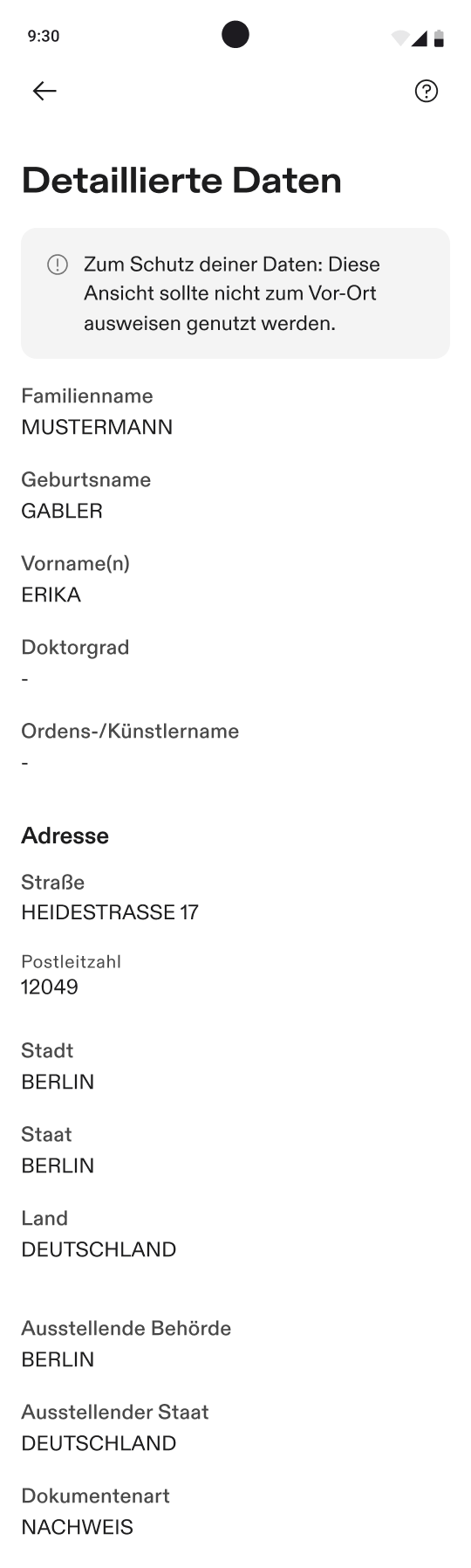
The credential data inspection screen shows detailed information on the contained attributes of a particular credential (PID or EAA).
The list of attributes is created by the following rules:
- contains all data attributes included by the PID/EAA Provider
- attribute names are translated by matching the WI's language priority list with the list of translations (
credential_metadata.claimsof the PID/EAA Provider's pp/ep_meta_data), where the claim path addresses the claim within the credential payload for SD-JWT VC and the pair of namespace and data element identifier for mdoc - attribute values are taken from the PID (pp_pid_credential) or EAA (ep_eaa_credential)
- for SD-JWT VC, payload claims are shown according to their hierarchy, nested data structures have sub-headlines (e.g. "Adresse"), if the parent claim has a translation in the metadata
- for mdoc, all data elements are shown in a single flat list
- attribute names are translated by matching the WI's language priority list with the list of translations (
- the order of data attributes is derived from the order of translations in the PID/EAA Provider's metadata (
credential_metadata.claimsof the PID/EAA Provider's pp/ep_meta_data) - contains no metadata of the credential format, in particular:
- no issuer identifier (
issfor SD-JWT VC, the issuer certificate chain withinissuerAuthfor mdoc) - no credential type (
vctfor SD-JWT VC,docTypefor mdoc) - no issuance date (
iatfor SD-JWT VC,validityInfo.signedfor mdoc) - no expiration date (
expfor SD-JWT VC,validityInfo.validFromandvalidityInfo.validUntilfor mdoc) - no device binding keys (
cnffor SD-JWT VC,deviceKeyInfo.deviceKeyfor mdoc) or other cryptographic data
- no issuer identifier (
- if PID/EAA Providers may explicitly include meta information as ordinary attributes (e.g.
issue_date,issuing_authority,issuing_country) they are displayed to the user
The screen shows a hint that discourages the user from using this view to identify themselves in person, as the displayed data is neither authenticated nor protected against manipulation.
Credential Issuer
The credential issuer inspection screen shows detailed information on the PID/EAA Provider. The information consists of:
- the PID/EAA Provider's logo (
display.logoof the PID/EAA Provider's pp/ep_meta_data) - the PID/EAA Provider's legal name (
sub_lnof the pp/ep_registration_cert) - the PID/EAA Provider's identifier (
subof the pp/ep_registration_cert) - the PID/EAA Provider's country (
countryof the pp/ep_registration_cert) - the PID/EAA Provider's privacy policy (
privacy_policyof the pp/ep_registration_cert), forwarding the user to the default system browser - the URI for support of the PID/EAA Provider, either an email or a website address (
support_uriof the pp/ep_registration_cert), forwarding the user either to the default system browser or email application
Transaction Log
The transaction log shows an overview of all issuance and presentation processes ordered by date, where each item shows:
- the PID/EAA Provider's name (
nameof the PID/EAA Provider's pp/ep_registration_cert) - the Credential's name (
credential_metadata.display.nameof the PID/EAA Provider's pp/ep_meta_data) and the timestamp of the transaction recorded by the WI - the PID/EAA Provider's logo (
display.logoof the PID/EAA Provider's pp/ep_meta_data, the Credential Issuer's own display information rather than the Credential's)